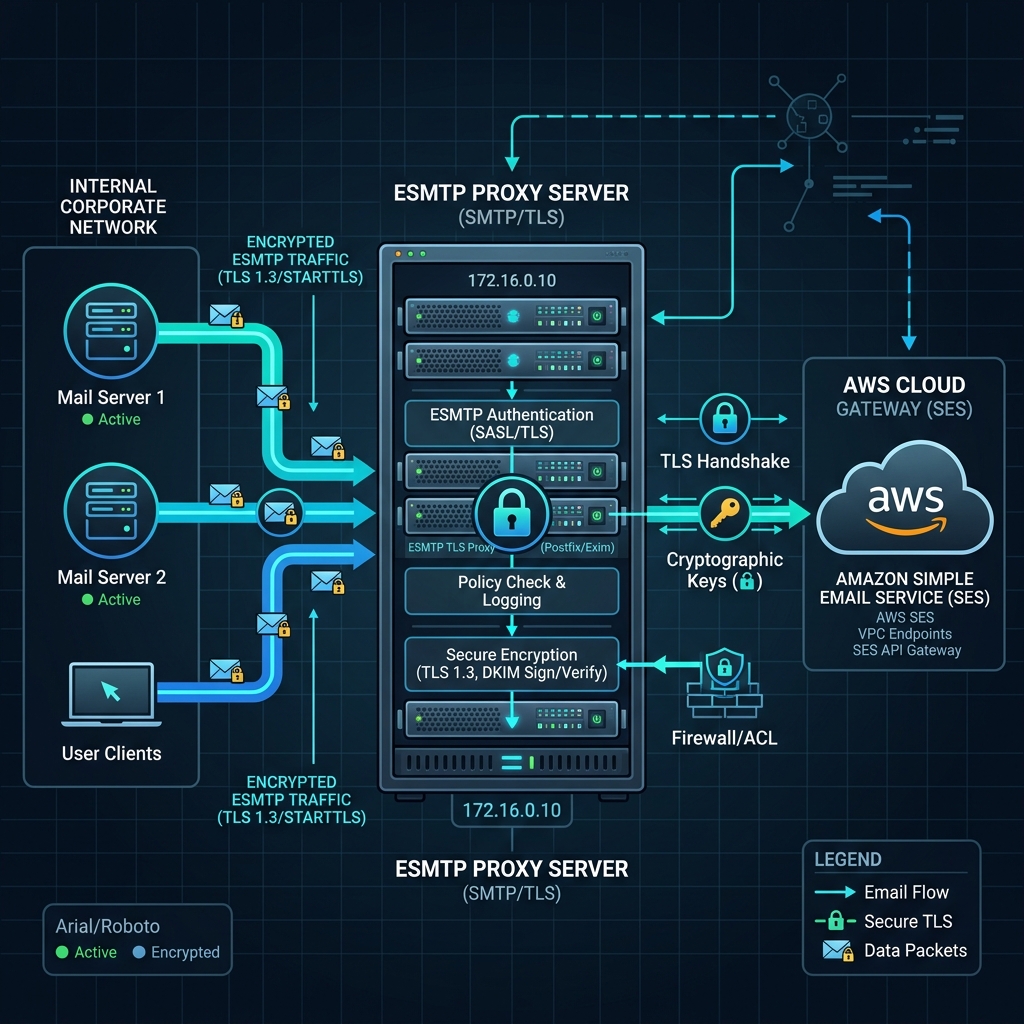
For enterprise environments, routing outbound email directly from multiple isolated servers to AWS SES can lead to security vulnerabilities, firewall overhead, and credential leaks.
Routing outbound email traffic through a centralized **ESMTP Proxy Server** before forwarding it to the AWS SES gateway simplifies network design and centralizes delivery rules.
---
## 1. Why Use an ESMTP Proxy?
Centralizing your mail routing through an internal proxy (like Postfix or Exim) has several key advantages:
* **IP Whitelisting**: Only the proxy server needs access to the public internet; all application nodes forward mail to the proxy internally.
* **Centralized Credentials**: AWS SMTP keys are stored only on the proxy server. App servers send mail without authentication keys.
* **Rate Limiting**: The proxy queue caches emails if AWS SES limits are breached, preventing message loss.
```text
[App Server 1] --\
[App Server 2] ----> [ESMTP Proxy Server] ----(TLS 1.3 / Auth)----> [AWS SES]
[App Server 3] --/
```
---
## 2. Configuring Postfix as an ESMTP Proxy to AWS SES
Here is how to configure a Postfix mail transfer agent (MTA) to act as a proxy relay:
### Step 1: Install Postfix
On your Ubuntu/Debian proxy server:
```bash
sudo apt-get update
sudo apt-get install postfix mailutils libsasl2-modules
```
### Step 2: Configure Main.cf
Edit `/etc/postfix/main.cf` to routing via AWS SES SMTP:
```text
relayhost = [email-smtp.us-east-1.amazonaws.com]:587
smtp_sasl_auth_enable = yes
smtp_sasl_security_options = noanonymous
smtp_sasl_password_maps = hash:/etc/postfix/sasl_passwd
smtp_use_tls = yes
smtp_tls_security_level = encrypt
smtp_tls_note_starttls_offer = yes
```
### Step 3: Set Credentials
Create the sasl password map file `/etc/postfix/sasl_passwd`:
```text
[email-smtp.us-east-1.amazonaws.com]:587 AWS_SMTP_USERNAME:AWS_SMTP_PASSWORD
```
Secure the file permissions and compile the lookup map database:
```bash
sudo chmod 0600 /etc/postfix/sasl_passwd
sudo postmap /etc/postfix/sasl_passwd
```
### Step 4: Restart Postfix
```bash
sudo systemctl restart postfix
```
Now, all server nodes within your virtual network can forward emails directly to your proxy IP on port 25 without SMTP keys, and the proxy relays it safely to AWS SES.